Picasso is a widely used library in Android Studio. It helps to load images of various formats. Images can be edited, resized and cropped using Picasso. It is named after the famous Spanish painter Pablo Picasso.
Steps to use Picasso:
1. In build.gradle, add implementation ‘com.squareup.picasso:picasso:2.5.2’
2. In Manifest file, add <users-permission android:name=”android.permission. INTERNET”/>
3. In layout file, add an <ImageView />
4. In Activity Java file, import the library by adding “import com.squareup.picasso.Picasso;” statement
5. Loading the image inside the Activity Java file: ImageView imageView = findViewById(R.id.imageView); Picasso.with(this) .load(“url/img”) .into(imageView);
6. To resize, simply add this to the Picasso instance: .resize(size, size);
7. To add a placeholder, simply add this to the Picasso instance: .placeholder(R.mipmap.ic_launcher);
8. To crop and make it fit, add this to the Picasso instance: .centerCrop() .fit();
Hyperledger is a project that consists of several frameworks and tools to implement private and permissioned blockchain. Initiated by the Linux Foundation that has a rich heritage of open source contribution, the Hyperledger project has been contributed by several giants, including IBM, Intel, Hitachi, Daimler, Samsung and Walmart – to name a few.
Fabric is a framework of the Hyperledger project that has been widely adopted by the industry to meet the demand of private blockchain. IBM boasts the lion’s share of contribution to this framework’s development so far. This framework has several advantages that make it ideal when it comes to permissioned blockchains. Fabric Samples is the greatest and smoothest work to get up and running.
Characteristics
Private Channels: Unlike Bitcoin and Ethereum, member to member private communications and transactions are supported.
Permissioned Network: Each entry to the network is permissioned and controlled.
Security: Certificate Authority and Membership Service Provider ensures overall security of the blockchain’s each transaction.
Distributed Ledger: Each peer and channel has its own copy of the ledger.
Chaincode Variety: One may write chincode in Golang, JavaScript, Java or TypeScript – all are allowed and valid.
Ledger Options: Options to store data either using LevelDB or CouchDB.
Setting PATH environment variable by: export PATH=<path to download location>/bin:$PATH
Whirlwind Tour of Directories
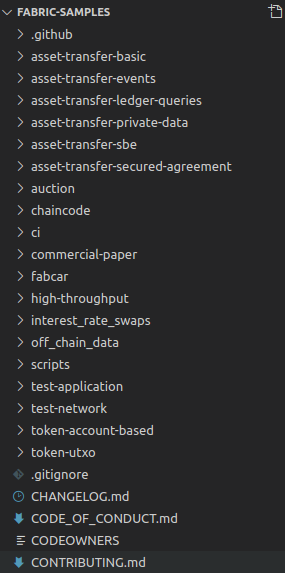
Fabric-Samples get one started with testing and customizing his / her own transaction logics . It consists of several sub-directories such as:
(a) asset-transfer sub-directories contain sample transaction logics (Go, Java, JavaScript and TypeScript) to develop business logic, make private channels and work with ledgers right out-of-the-box
(b) chaincode folder holds chaincodes (similar to smart contracts) to get started
(c) test-network brings up a sample network of two organizations, each consisting of two peer nodes to implement a practical blockchain
(d) token-utxo is there if someone needs to produce ICOs or Coins in a project
(e) README.md highlights an overview of sample ready-to-use projects
Ethereum is a public blockchain used worldwide. It has rich features to implement “Smart Contracts”. A smart contract is basically a program that contains the business-logic and transaction related conditions that has to be deployed on a specific peer.
Web3py: It is a Python library that eases the interaction between the client and the Ethereum blockchain. Infura: This is a node provider that lets us use remote nodes without prior setup.
The following program connects to the Ethereum blockchain and inspects block-specific details:
Redis is a project by Redis Labs whose sole purpose is to implement an in-memory database that supports various data structures. Originally developed by Salvatore Sanfilippo in 2009, its current version is 6.0.9 as of September 11, 2020.
Redis is open-source and is under BSD license. Mainly its of key-value nature and written in ANSI C.
Useful Redis Commands
Setting a value: SET chapter 67
Retrieving a value: GET chapter “67”
Setting multiple key-values: MSET start “Fatiha” complete “Naas” OK
Incrementing a value: INCR chapter (integer) 68
Decrementing a value: DECR chapter (integer) 67
If a value exists: EXISTS chapter (integer) 1
When a value exists not: EXISTS name (integer) 0
Removing a value: DEL chapter (integer) 1
Removing all keys: FLUSHALL OK
Setting a server name: SET server:name Zend OK
Getting a server name: GET server:name “Zend”
Setting a server port: SET server:port 8083 OK
Getting a server port: GET server:port “8083”
Renaming a key: RENAME chapter sura OK
Authenticating a user: AUTH MyUserName PasswordIs123 OK
Assigning a name to current connection: CLIENT SETNAME Farial
Retrieving the current client’s name: CLIENT GETNAME “Farial”
Printing any value: ECHO “Quran.” “Quran.”
Closing server connection: QUIT OK
Setting a hash value: HSET myhash f1 5 1
Getting the hash value: HGET myhash f1 “5”
Getting number of hash fields: HLEN myhash 1
Adding key-value to a list: LPUSH ThisList 1 2 3 (integer) 3
Sorting a list: SORT ThisList 1 2 3 (Sorts in ascending order, to reverse the sorting – add DESC to the command)
Removing the last value from list: LPOP ThisList “3”
Adding members to aset: SADD Set 3 2 1 (integer) 3
Checking members of a set: SMEMBERS Set (1)”3″ (2)”2″ (1)”1″
Joining two sets: SUNION Set1 Set2
Difference between two sets: SDIFF Set1 Set2
There are more commands available to work with a Redis database if you need. You may find them on http://www.redis.io .
GIT is a version control system that tracks all the changes in a project or file. It is widely used by developers all over the world due to its simplicity and efficiency. GIT and GitHub are not the same – GitHub is an online host or storage where files or projects can be saved, updated or edited using GIT.
” So, GIT is like your Keyboard whereas GitHub is your Computer Memory. “
GIT is:
1. Open Source 2. Free 3. Distributed 4. Fast 5. Efficient
GIT Commands
1. git init initiates a new local repository 2. git status shows current project status 3. git add . copies all the files to the repository 4. git add FileName adds a specific file to the repository 5. git commit -m “Your Message” commits and highlights a message 6. git remote add origin <URL> connects the local repository to the URL-linked online repository 7. git push origin master pushes changes to the remote repository 8. git log highlights all the commits 9. git blame FileName shows the users that updated the file with time 10. git branch -av displays all the connected branches 11. git branch BranchName produces a new branch 12. git branch -d BranchName deletes a branch 13. git remote show RemoteRepo gives information on a remote repository 14. git fetch RemoteRepo downloads information from a remote repository 15. git merge adds a branch to the current Head 16. git pull RemoteRepo BranchName works as fetch+merge action 17. git mergetool initiates the mergetool to resolve conflicts
These commands would be extremely helpful to get started with GIT version control system.
Just-In-Time Compiler is a special type of compiler, or component of an environment that combines the power of compilation and interpretation to boost performance. It is a mid-way between compiling and interpreting. Although the term was coined by James Gosling later, John McCarthy and Ken Thompson are the pioneers in developing this technology.
Functionality
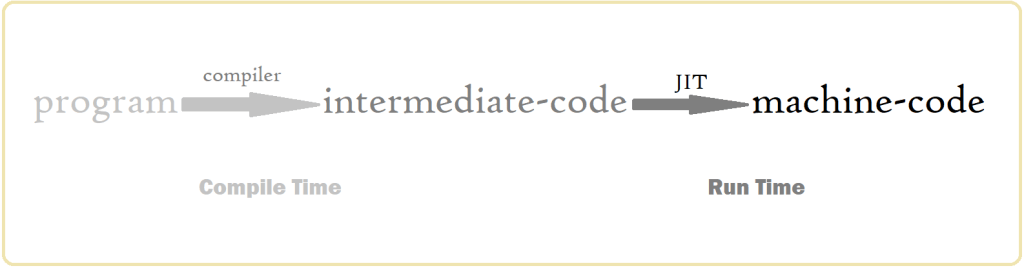
A JIT compiler’s execution is done at two stage: compile time & run time.
Compile Time: A program is turned into an intermediate form (bytecode). At this level, the the intermediate code is quite slow.
Run Time: Here, the bytecode is powered by JIT to be compiled targeting CPU-specific architecture. The bytecode is turned into machine code (known as dynamic compilation). As a result, performance dramatically upgrades.
credit: Tishan’s Wall
Advantages
Speed-boost
Interpreter-like flexibility
Cache optimization
Better performance than interpreter and static compiler
Composer is a package manager for the PHP programming language, its frameworks (i.e. Laravel, Symphony, CodeIgniter and more), Ecommerce platforms (i.e. Magento) and Content Management Systems (i. e. Drupal, SilverStripe) . Developed by Nils Adermann and Jordi BoggianoIt (2012), it deals with software distributions as well as performing package-related operations from installing to updating to removing. As a dependency manager, Composer handles necessary libraries and dependencies.
Installation Process
There are several ways to download and install Composer.
Through script: Running this script initiates the installer, runs and after successfully installing, removes the installer: php -r “copy(‘https://getcomposer.org/installer’, ‘composer-setup.php’);” php -r “if (hash_file(‘sha384’, ‘composer-setup.php’) === ‘e0012edf3e80b6978849f5eff0d4b4e 4c79ff1609dd1e613307e16318854d 24ae64f26d17af3ef0bf7cfb710ca747 55a’) { echo ‘Installer verified’; } else { echo ‘Installer corrupt’; unlink(‘composer-setup.php’); } = echo PHP_EOL;” php composer-setup.php php -r “unlink(‘composer-setup.php’);”
This script has been developed for version 1.10.1 (As of 2020-03-13). Kindly, have a look at https://getcomposer.org/download to see changes for newer versions.
Directory-specific Installation: To install to a specific directory, open your command-line terminal and run: php composer-setup.php –install-dir=bin To download a specific version, for example, ” 1.0.0-alpha8”, add the –version flag like below: php composer-setup.php –version=1.0.0-alpha8
Composer commands can be run flexibly from the cmd (command line interface). Widely used Composer commands are mentioned below:
Adding Packages: To add any package to your project, open your command-line and type: composer require vendor/package Example: composer require laravel/socialite (adding –dev inserts the package into composer.json’s require-dev section and then install)
Installing Libraries & Dependencies: To install libraries and dependencies mentioned in the composer.json file: composer install
Updating Packages: There are various types of updating options available. (a) To update all the packages: composer update (b) To update all the packages along with their dependencies: composer update –with-dependencies (c) To update a certain package: composer update vendor/package (d) To update a specific vendor’s all packages: composer update vendor/* (e) To update composer.lock without updating any package: composer update –lock (f) To update the autoloader: composer dumpautoload (adding -o ensures optimization)
Removing Packages: To remove a specific vendor & its package name from the composer.json and uninstall that package: composer remove vendor/package
Composer is the de facto dependency cum package manager for PHP and its allies. Moreover, packages from Packagist can be easily installed using Composer.
A Single Page Application (SPA) refers to a modern web application that can load its sections dynamically as required, rather than traditional full-page loading. It requires the combined use of several frontend technologies to build an SPA. Development of such applications are on the rise due to the performance and advantages over traditional websites.
Features
Native-like View
Dynamic Rendering
Interactive
Flexible caching
Development
Developing a Single Page Application is more of a frontend-battle than a backend development. To speak frankly, JavaScript has taken the lead in producing Single Page Applications by all means. These are the frameworks and technologies that are intensively used to develop SPAs:
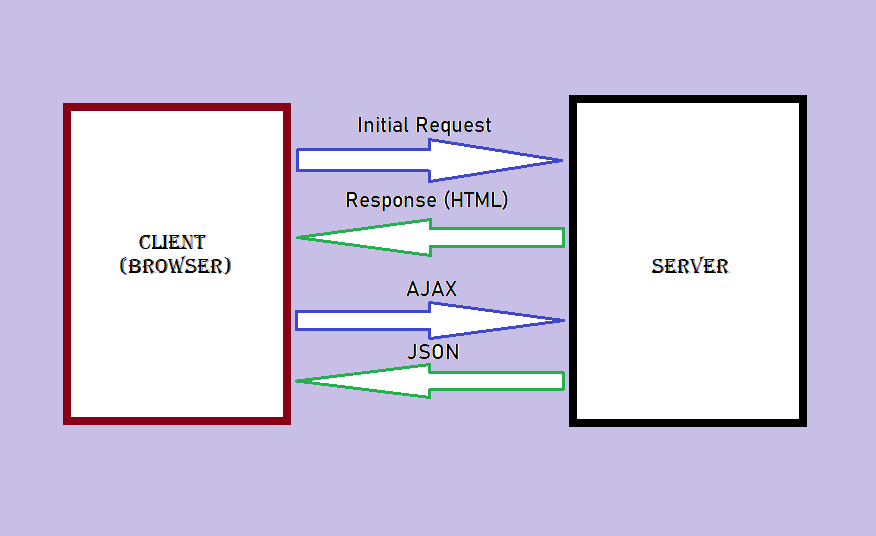
The working of an SPA differs from a traditional web application. At first, the client browser sends an initial request to the server and thus receives a resource or HTML in response. Next, each time the client needs to send any request to the server, it implements AJAX and the server responds to the client browser with real-time JSON data. This is how only the requested section gets dynamically updated in SPAs.
Single Page Application Architecture (Tishan’s Wall)
Pros
Faster loading
Dynamic updating
Less use of resources
Instant response to actions
Suitable for real-time communication
Offline activity
Throughput
Cons
Not quite SEO-friendly
Initial load might take longer
Incompatible with Google Analytics (as that requires full-page loading)
Vulnerable to attacks
Real-world Examples
A well number of technology giants have successfully implemented the SPA technology. Some of the famous SPA sites that we use on a daily basis are:
Gmail
Google Drive
Trello
Twitter
WhatsApp Web
Conclusion
Once SPAs achieve the ability to be crawled and indexed properly by search engines, they deserve to have a bedrock position in the web development race.
Fuchsia is the name given to an operating system that is under development at Google. Little is officially known about this project so far. According to fuchsia.dev,
“Pink + Purple == Fuchsia (a new Operating System)”
The aim behind developing this operating system is to build a system that works across all types of hardware devices (i.e. from phones to tablets to home automation systems).
History
Initial release of its codebase on GitHub was made on 15th August 2016. Google broke the silence about Fuchsia at Google I/O 2019 as an ongoing experiment. Its official website, https://fuchsia.dev was announced on July 01, 2019.
Core Development
Fuchsia is open-source and powered by a microkernel named Zircon. It has been developed to scale almost all sorts of applications from embedded to mobile to desktop apps. Its zyscalls are highly-efficient and non-blocking.
Features
Universal platform for all device types
Concurrent multi-tab view
Scaling power
High-performing support
Rich Graphics & UI
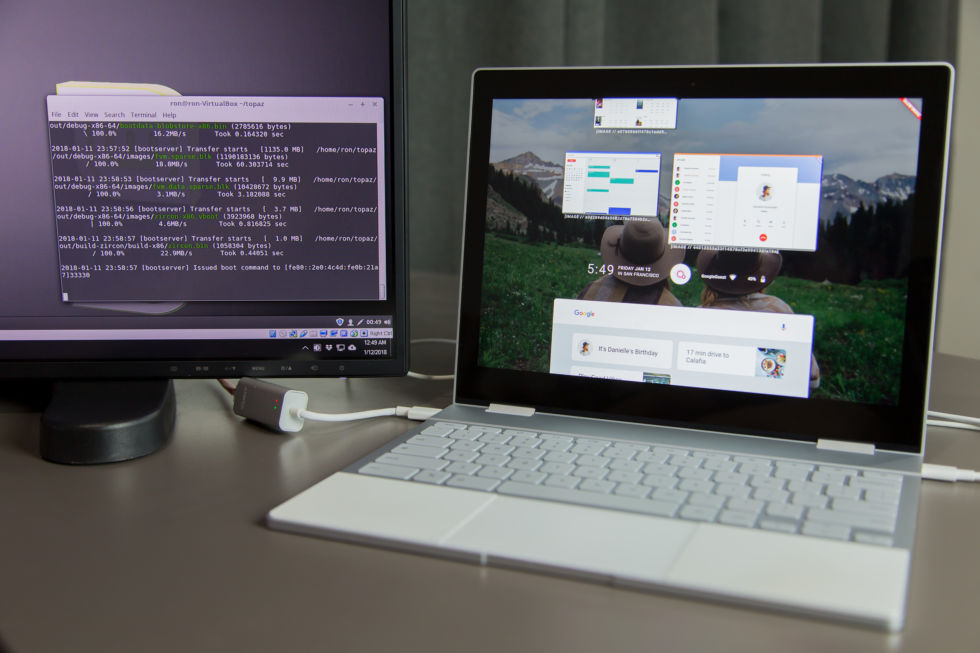
Fuchsia OS on Pixelbook (Credit: Ars Tecnica)
Technical Stack
As of now, these languages have been implemented to build Fuchsia:
C
C++
Dart
FIDL
GO
Rust
However, its official website states that it is open to aspiring contributors if they wish to bring other languages to add to this system.
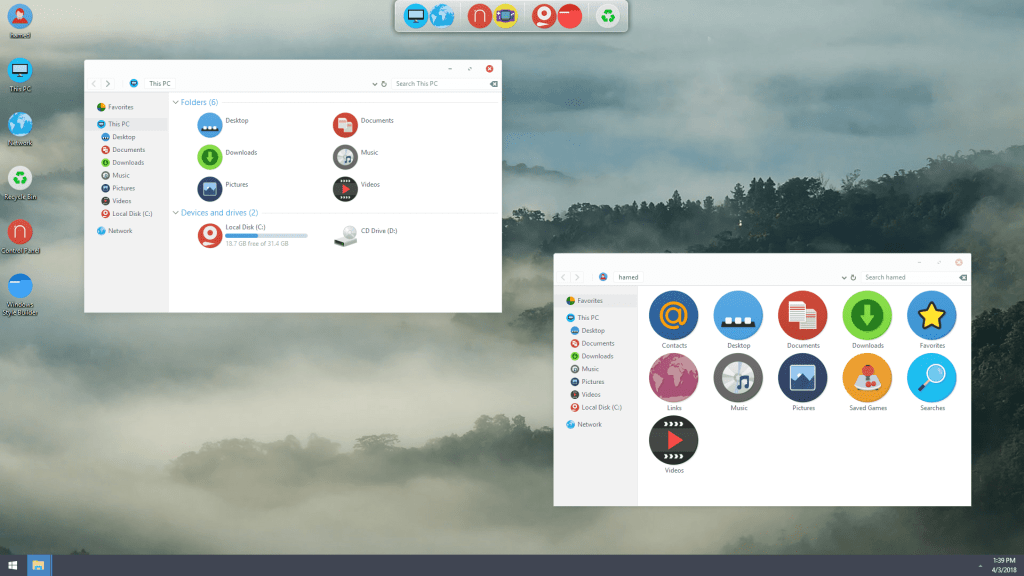
Fuchsia OS on Windows 10 (Credit: SkinPack Pinterest)
Conclusion
Although Fuchsia is still at a development stage, it has attracted attention around the world. If this project becomes successful, it may showcase the potential to replace existing operating systems and thus, devices of all types will be run on a single operating system.
A search engine, also known as a web search engine, is a system software that discovers relevant contents on the internet based on given queries. It is one of the most widely used softwares all over the world.
History
WHOis was the first domain search engine with limited capabilities invented in 1982. Alan Emtage, together with Bill Heelan and Peter Deutsch developed a content search engine named Archie that could make a directory list of files on FTP sites and produced a searchable database. The first full-fledged web search engine was W3Catalog developed at the University of Geneva in 1993.
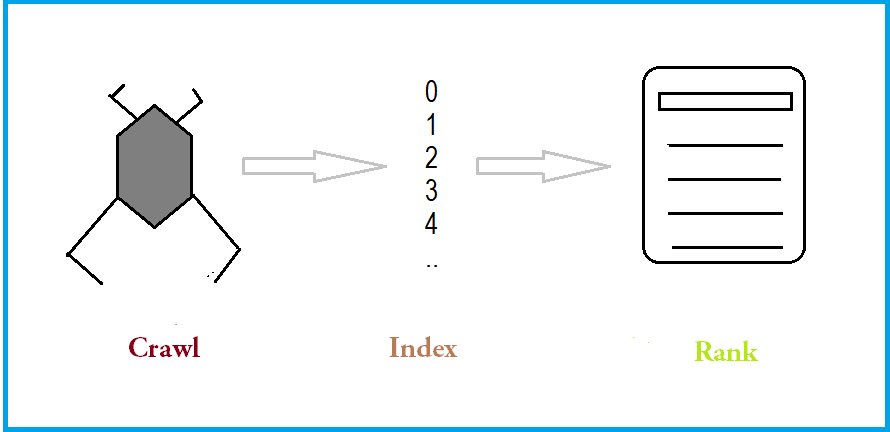
A search engine has three steps to implement to produce a result. These three steps are detailed below:
Crawling: AKA spidering, is a process in which an automated script or computer program is used to crawl through the web for specific content. This helps in producing an index of relevant contents. A crawler is also sometimes called a Spiderbot. It can detect HTML errors and broken links. Robots.txt file contains data on how to crawl or if not to crawl the website.
Indexing: After a web crawler crawls through the web, an index of related sites is produced and displayed in paging. Keywords and metadata are specifically searched to index webpages. Formats that are supported by search engines to index are: ASCII text file CAB HTML PDF MS Word, Excel & PowerPoint Lotus Notes RAR TAR XML ZIP etc.
Ranking: Finally, relevant sitse are given ranks based on factors such as quality, uniqueness, mobile optimized , accessability, backlinks, loading speed etc. Google Search Console helps to find out if a particular website is properly accessible.
Search Engines (Tishan’s Wall)
Next, webpages are displayed as what is called SERP (Search Engine Result Pages). This is published in paging depending on the browser’s configuration.
Custom Search Engines
A custom search engine helps to view specific results as required by the users. Currently, these are the two popularly active custom search engines:
Google Custom Search Engine: Developed at Google in 2006, it provides a beautiful way of customising searches, refine and view as expected by a user. Official Website: cse.google.com
Bing Custom Search: Developed by Microsoft Corporation, it has a powerful API to refine search results and show the user. It is totally free to use at any scale with no ads. Official Website: http://www.customsearch.ai
Popular Search Engines
As of today, there are many vendors who provide search engine services. Google’s search engine has the largest market share worldwide on all the platforms. However, Yandex leads the market in Russia whereas Baidu tops in China.
Credit: Webfx (Feb, 2020)
Writing a Search Engine
Since a search engine is a multi-level complex software to make, its internals can be divided into three layers:
Frontend: JavaScript
Middle Layer: General-purpose languages (ex. Java, Python, PHP)
Backend: C++, C, Rust, GO
Conclusion
Search engines are a crucial part of today’s technology. The more relevant and neutral contents users get, the more they benefit.
SCRUM is an agile framework to handle complex projects. It is lightweight in nature and is matured enough to work with large projects. Ken Schwaber, together with Jeff Southerndown developed the Scrum framework in early 1990s.
Although it is mostly implemented in software development, its popularity in other non-IT domains keeps surging.
Roles: There can be three different types of role in a Scrum project:
1. Product Owner: Works as the liaison between the stakeholders and the development teams. His/Her other duties may include:
Representing customers, users and stakeholders
Making user-stories
Describing a project’s goals
Keeping the stakeholders updated on the current status of product
Planning and announcing releases
2. Team Member: A team may consist of several members responsible to develop the product. Teams are expected to be self-organizing and cross-functional. Generally, a SCRUM team has 10 members.
3. Scrum Master: A Scrum master challenges the teams to improve, helps in removing obstacles and ensures good Scrum practices. A Scrum master is not a project manager as such teams are self-organized enough to avoid the need of a project manager.
Key Terms in SCRUM
Backlog: A backlog refers to the list of features to be added to a project or, to be developed in one sprint. After the Product Owner describes the user stories, these are shifted from Product Backlog to Sprint Backlog list.
Figure: Items shift from Product Backlog to Sprint Backlog
Planning Meeting: Meetings take place before the beginning of every sprint where the Product Owner selects and highlights the user-stories for the upcoming sprint.
Sprint: A sprint is a timeboxed incremental iteration to develop software pieces. Each sprint usually consists of 30 days of less – based on the teams’ performance and affecting factors.
For example, in the middle of a sprint, if new requirements add to the project, the sprint may take longer than expected to finish. It can also delay due to unexpected complexity in development. The result of each single sprint is a piece of working and tested software – also known as Potentially Shippable Increment (PSI).
Daily Scrum / Scrum Standup: A daily stand-up meeting of usually 15 minutes duration to focus on three key points:
Achievement since last the meeting
Obstacles
Next accomplishment
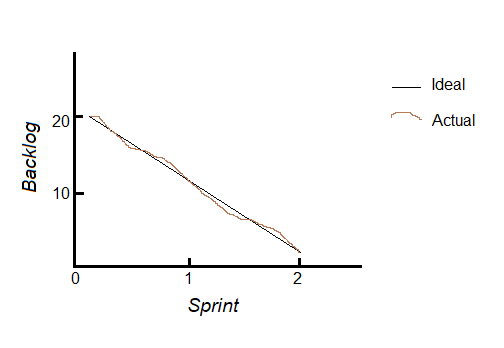
Burndown Chart: It is a chart that is used to measure progress during each iteration. If X-axis gets the sprints or time and Y-axis gets backlog or workload, then we get:
Figure: Burndown Chart (Backlog vs. Sprint)
Here, each sprint requires 10 tasks or logs to be completed. Note that the actual workflow may vary at times due to several factors, like change in requirements or sudden complexity. The black line refers to the ideal flow to finish the project in 2 sprints.
Velocity: Velocity refers to the total backlog items to be completed in one sprint. In case of the above-mentioned Burndown Chart, velocity of each sprint is 10.
Planning Poker: A game in which team member participate by using deck cards to give their estimation on how much time the next sprint may take to finish. As each member’s estimation is taken into consideration, it helps in fixing a standard time amount for the upcoming sprint. If one member indicates an amount that is far beyond the average amount given by other members, he or she is given a scope to express (AKA Soapbox) why it may take that much time to finish since he or she may know of shortcut ways or complexity that others have not thought of.
Best SCRUM Practices
Keeping each team of 10 members or less
Daily Scrum should take place at the same time on every working day
Allowing experienced remote members join the meetings if necessary
Announcing releases based on practical estimation (i.e. 20 week-hours instead of 17.5)
Potentially Shippable Increment (PSI) should be working enough to be deployed
AI (Artificial Intelligence) has been the buzzword of this decade. It is the technology to give a machine or program the ability to copy human cognition or simply, to solve problems on its own. Programs that implement AI algorithms require high efficiency and optimiza
Machine Learning models are no more just desktop-based. With the advancement of the web, there are now several rich libraries that can be used to produce models, train those and visualize output in the browser. Both machine learning and deep learning models can be produced in JavaScript, PHP and Ruby.
These libraries have heavily contributed to bringing Machine Learning on the web:
1. TensorFlow.js:
Managed by Google, it is a reputed JavaScript library to produce & train machine learning models in JavaScript and run in the browser. Models written in Python TensorFlow can be converted to JavaScript using TensorFlow.js .
PHP has been present on the web since almost the beginning. RubixML is a high-level open-source library to produce machine learning models using PHP. It comes with support for more than 40 different machine learning and deep learning algorithms written in PHP.
Another open-source library, machine learning models can be developed in PHP using PHP-ML. If you want to perform Data Mining and Data Analysis in PHP, PHP-ML is your choice. This library requires no additional dependencies.












 Tishan's Wall
You must be logged in to post a comment.