
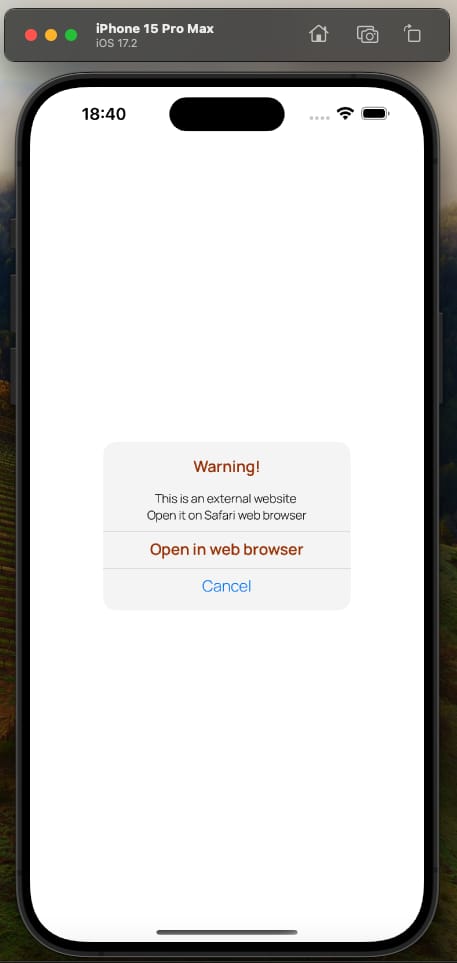
Background Story: iOS apps typically use an in-built .alert function (found in SwiftUI framework by default). It is quick to implement but difficult to modify if a client demands a specific design.
Example Use Case: If a design requires to implement an alert dialog box that has multiple buttons or different customized colors for each text lines, the default .alert function would not be fit for such a specific client demand. In similar cases, iOS developers need to implement their own custom alert boxes that meet the clients’ demands.
Code:
import SwiftUI

struct CustomAlert: View {

// to open a URL in the web browser
@Environment(.openURL) var openURL

// to switch the alert on or off
@State private var showingAlert = true

var body: some View {

NavigationView {

  VStack(alignment: .center) {

         Text("Warning!")
           .foregroundStyle(.A_23704)
           .font(.custom("Manrope-SemiBold", size: 17))

         Text("This is an external website")
           .font(.custom("Manrope-Light", size: 13)).padding(.top, 1)
    Text("Click to open it on web browser")
      .font(.custom("Manrope-Light", size: 13))
      .padding(.bottom, 1)

    Rectangle()
      .fill(.a1A1A1)
      .frame(width: 283, height: 0.3)

         Text("Open in web browser").foregroundStyle(.A_23704)
           .font(.custom("Manrope-SemiBold", size: 17))
           .padding(.bottom, 1)
           .onTapGesture {
             openURL(URL(string: "https://www.banbox.in")!)
           }

    Rectangle()
           .fill(.a1A1A1).frame(width: 283, height: 0.3)

         Text("Cancel").foregroundStyle(.blue)
           .font(.custom("Manrope-Light", size: 17))
           .onTapGesture {
             // tapping Cancel may put the custom alert box down
             showingAlert = false
           }
       }
       .frame(width: 270, height: 184)
       .background(Color.F_5_F_5)
       .cornerRadius(14)

  }
 }
}

Preview {
CustomAlert()
}
So, this is how a custom alert dialog box can be implemented using Swift for iOS apps.
 Tishan's Wall